One expired COI.$500K. Gone.
VendorFlow autonomously tracks every sub's insurance, licenses, and compliance — chasing renewals and scoring risk so you don't have to.
Start Free Trial90 days free · No credit card required
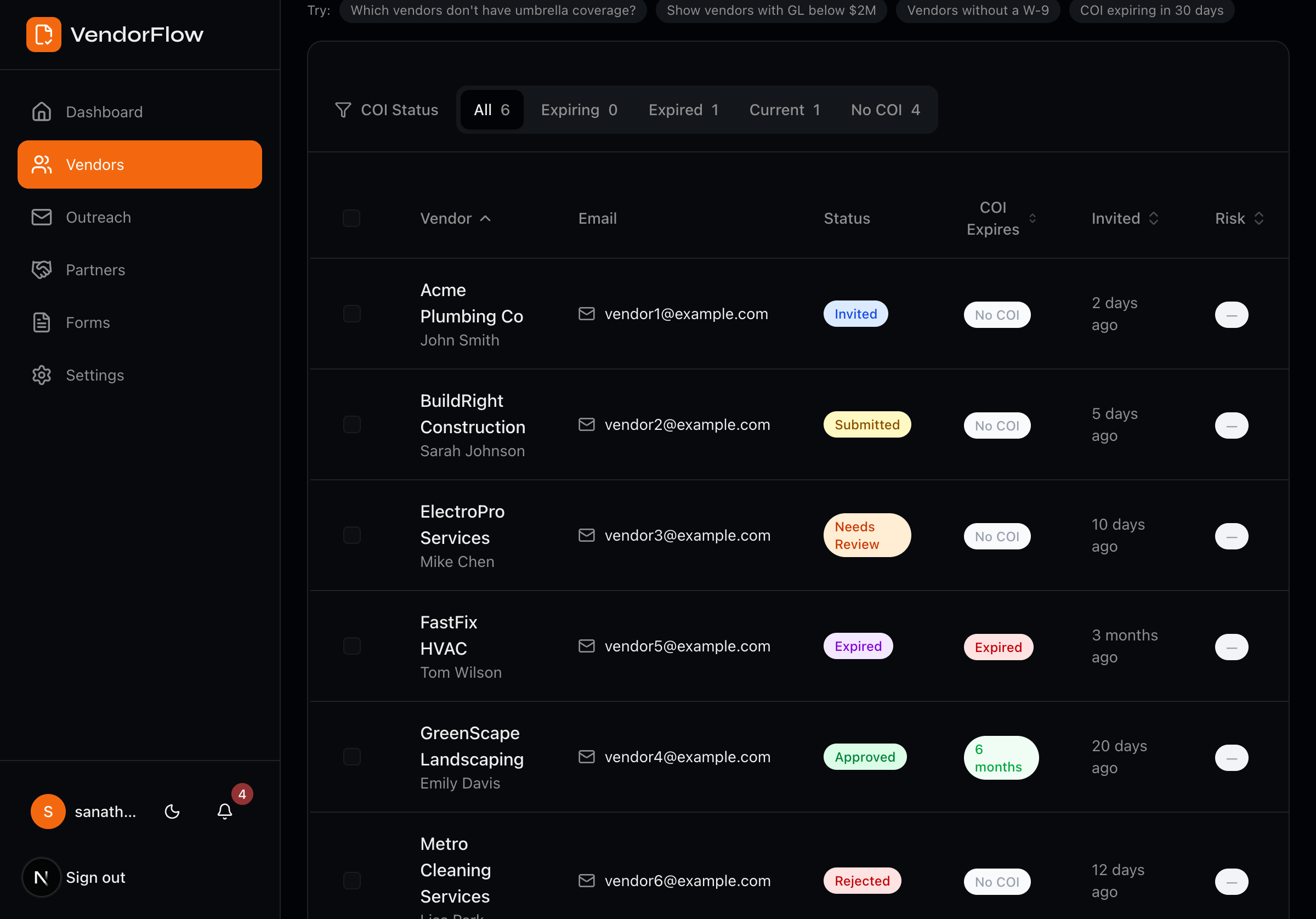
Monday morning. Coffee.
One glance. Every sub compliant.
That's what autopilot feels like.
The compliance coordination nightmare ends here
Sound familiar? You're not alone.
Manually tracking COIs, licenses, EMR letters, and W-9s across spreadsheets that are always out of date
Chasing vendors for updated documents with no escalation path when they ignore your emails
No visibility into vendor risk until an audit or incident forces you to scramble
Audit prep is a fire drill—pulling compliance status for 50+ vendors takes days
Autonomous compliance ops from invite to renewal
One magic link starts it. AI handles everything in between. You approve.
Invite via magic link
Vendors upload their COI, W-9, license info, and EMR letter through a branded portal. No accounts or passwords.
AI verifies everything
AI parses documents, checks coverage against scope-specific requirements, and verifies contractor licenses automatically.
System runs on autopilot
Auto-chase renewals, escalate to brokers and PMs, score vendor risk, and get a weekly compliance digest—hands-free.
“I built VendorFlow because I watched GCs lose projects to compliance gaps they didn't see coming. Every feature on this page exists because a real GC told me they needed it.”
— Sanath, Founder
Everything you need to run compliance on autopilot
Scope-Aware Validation
Coverage limits auto-adjust by work type and contract value — roofers get higher requirements than painters. Never under-insure a high-risk trade again.
Auto-Escalation Chain
When a vendor ignores you, the system escalates to their broker, then your PM, then flags payment hold — automatically. No more emails into the void.
Vendor Risk Scoring
Every vendor gets an A/B/C/D grade based on responsiveness, compliance history, coverage adequacy, and document recency. Sort, filter, and act on risk.
License Verification
CA contractors verified via CSLB. All other states flagged with direct links.
Weekly Digest
Compliance rate, trends, expiring COIs, and what needs attention — every Monday.
AI Coverage Queries
Ask in plain English: 'Which vendors have GL under $2M?' Instant answers.
Renewal Chase
3-email sequence before expiration. No response? Escalation kicks in.
Human-in-the-Loop
AI handles collection and verification. You approve with one click.
The Math: Replace a Compliance Coordinator
See how VendorFlow compares to hiring
*Based on $55/hr compliance ops cost and $55,000/yr coordinator salary.
Simple, transparent pricing
A compliance coordinator costs $55,000/yr. VendorFlow starts at $3,588/yr.
Starter
Up to 50 vendors
- AI document parsing (COI + W-9)
- Scope-aware coverage validation
- Renewal chase automation
- Magic link vendor portal
- Email support
Operations
Up to 150 vendors
- Everything in Starter
- Auto-escalation chain
- Vendor risk scoring (A/B/C/D)
- License verification
- Weekly compliance digest
- AI coverage queries
- Priority support
Enterprise
Unlimited vendors
- Everything in Operations
- Custom compliance rules
- Dedicated account manager
- SSO & custom integrations (coming soon)
- SLA & volume discounts
Core Compliance
Document parsing, coverage validation, renewal chasing
Full Autonomy
Adds risk scoring, license checks, auto-escalation, and weekly digest
Custom + Dedicated
Custom rules, dedicated manager, SSO, and volume pricing
Founding customers get 90 days free. No credit card required.
Export all your data and documents anytime, even if you cancel.
Frequently asked questions
VendorFlow parses and tracks Certificates of Insurance (COIs), W-9 forms, and EMR letters. AI extracts coverage amounts, policy numbers, expiration dates, tax IDs, and experience modification rates automatically.
No. Vendors receive a magic link and can upload all their documents in minutes—no signup, no passwords. Less friction means faster compliance.
VendorFlow adjusts coverage requirements based on each vendor's work type and contract value. A roofer on a $500K contract needs higher GL limits than a painter on a $20K job. Requirements are applied automatically.
VendorFlow sends a 3-email chase sequence. If the vendor doesn't respond, the system escalates to their insurance broker, notifies your project manager, and can flag a payment hold—all without you lifting a finger.
Every vendor gets a composite score (0–100) and letter grade (A/B/C/D) based on four dimensions: responsiveness to requests, compliance history, coverage adequacy, and document recency. Grades update automatically as new data comes in.
Yes. CA contractors are verified automatically via CSLB. All other states are flagged for manual review with direct links to each state's licensing board.
You're right—we're early. That means you get direct access to the founder, your feedback shapes the product, and you lock in early pricing. We ship updates weekly and every feature listed on this page is built and working today.
Your compliance, handled.
Start free. Stay as long as it's working.
Founding customers get 90 days free and a direct line to the founder.
No credit card · Cancel anytime · Your data is always yours